

ChatTCP: PCAP Viewer & Analyzer
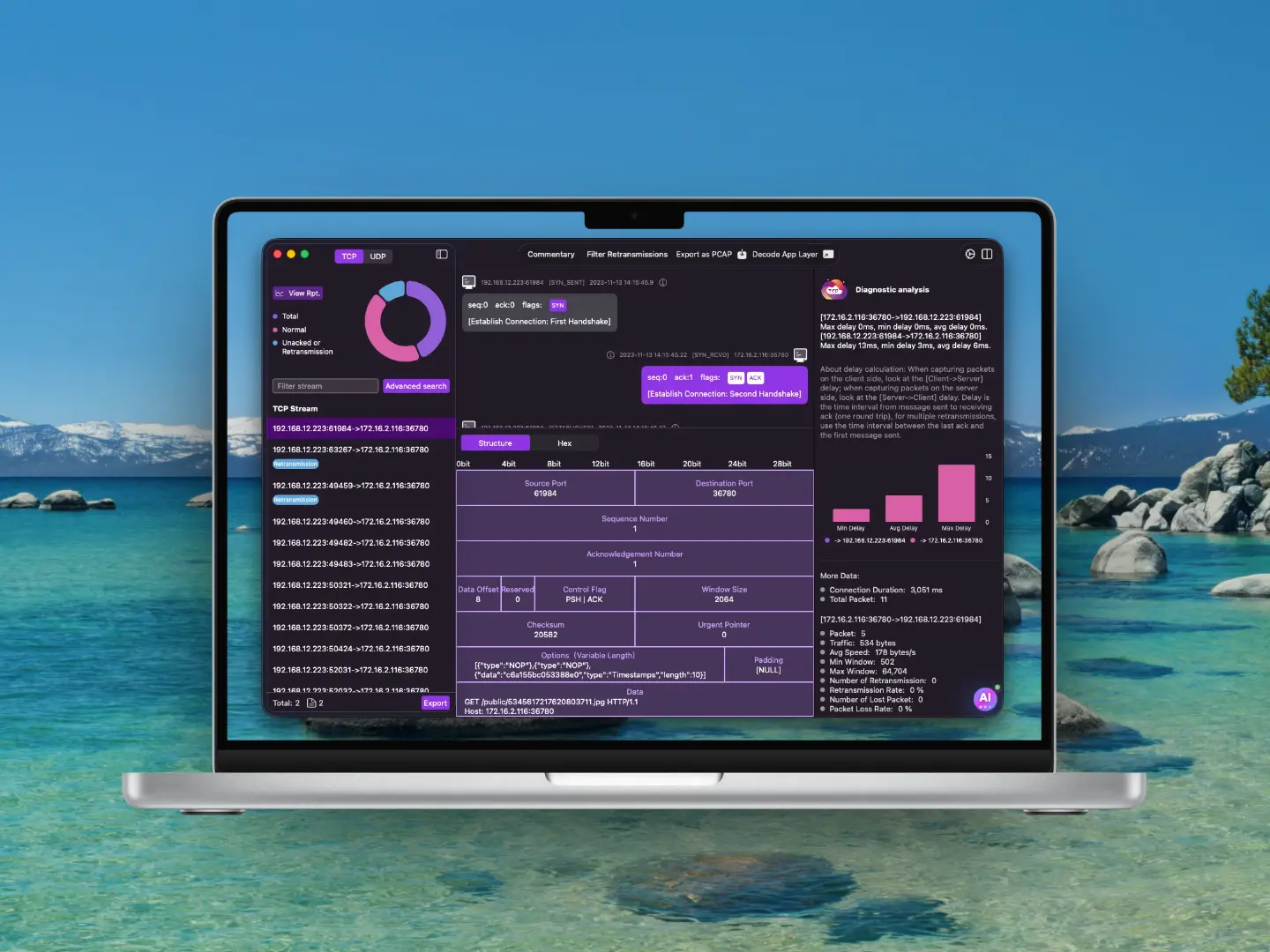
ChatTCP makes viewing network packets as easy as reading chats! Supporting TCP & UDP.
Effortless TCP Packet Viewing & Analysis
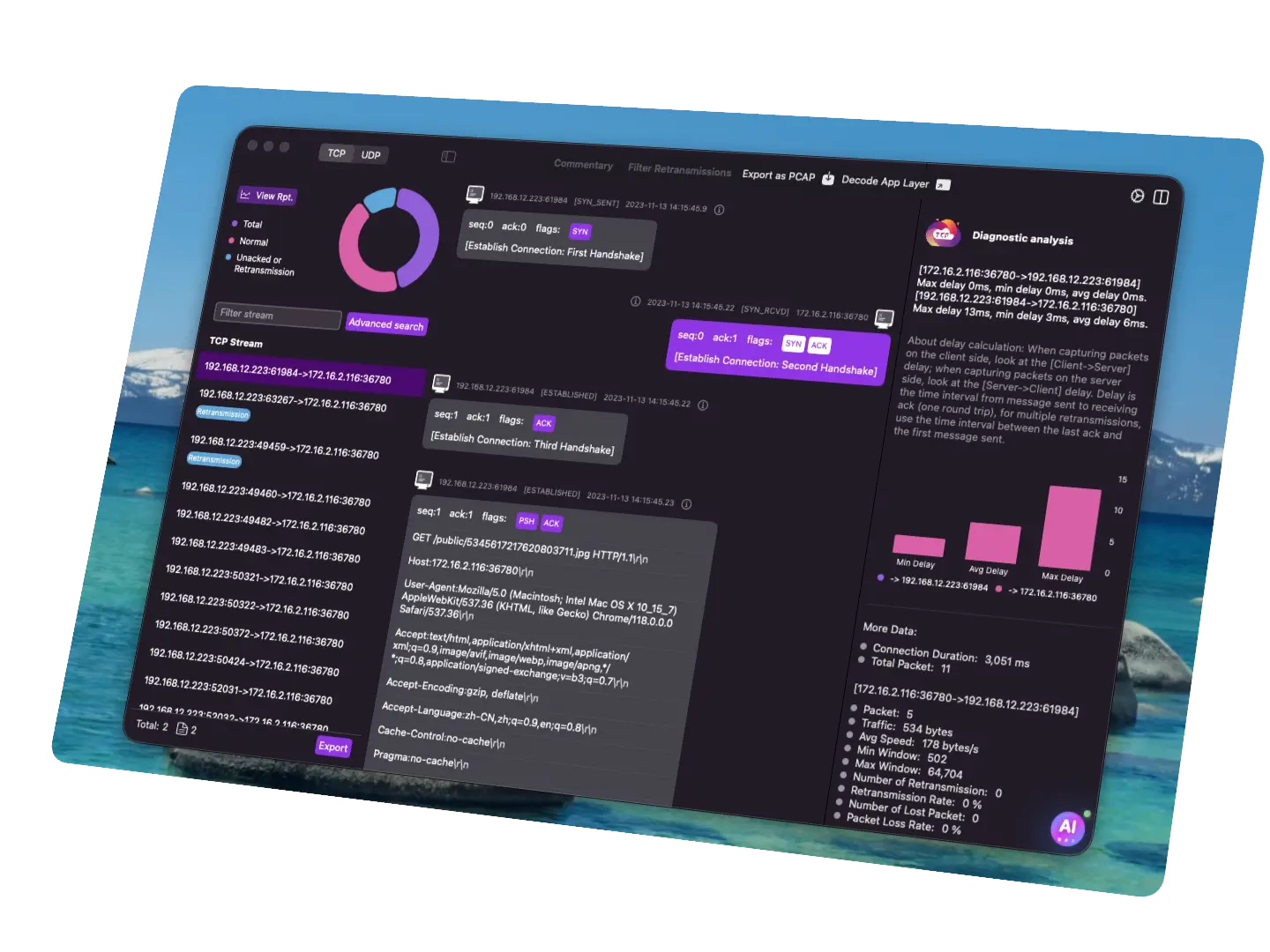
• Browse TCP packets just like reading a chat log.
• View TCP packet details in a TCP protocol data structure view.
• Every TCP packet includes commentary to aid understanding.
• Automatically analyze TCP connection latency, retransmission and packet loss, abnormal disconnections, and incomplete handshakes.
• Automatically detect anomalies in HTTP protocol packets.
• Provide an AI assistant to help analyze TCP network issues.
Read Application-Layer Data with Ease
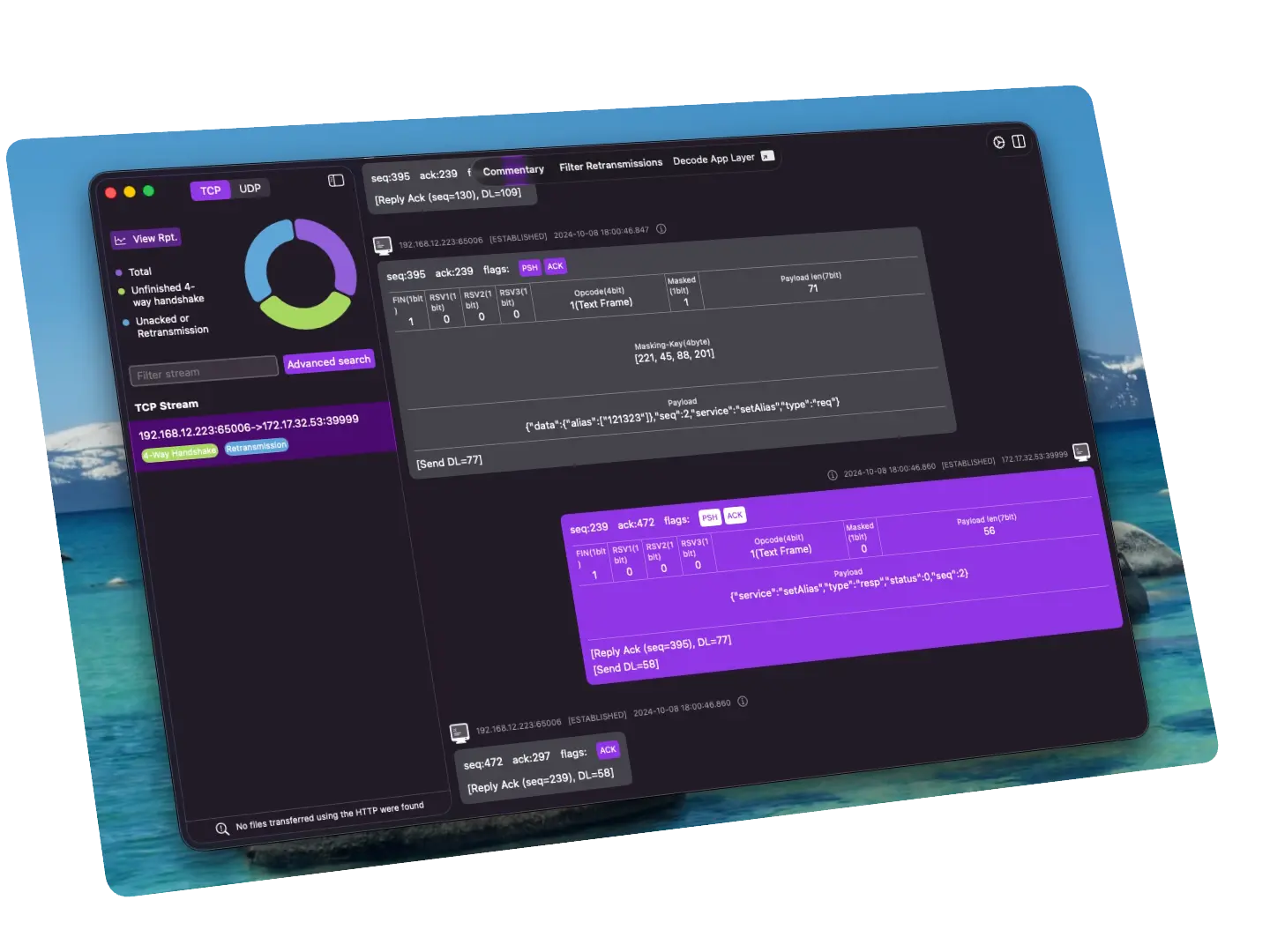
You don't need to know a protocol's data structure beforehand to make sense of the data. As you read through decoded payloads, you'll naturally internalize how each protocol structures its messages. Supports HTTP, WebSocket, Redis, MySQL, DNS, and more.

Understand Network Protocol Internals with Ease
ChatTCP provides multiple PCAP examples for every beginner to learn and master TCP/UDP protocols as well as application-layer protocols such as HTTP and WebSocket.
Also included are troubleshooting examples to help you learn how to diagnose network issues.
Filter Packets with Ease
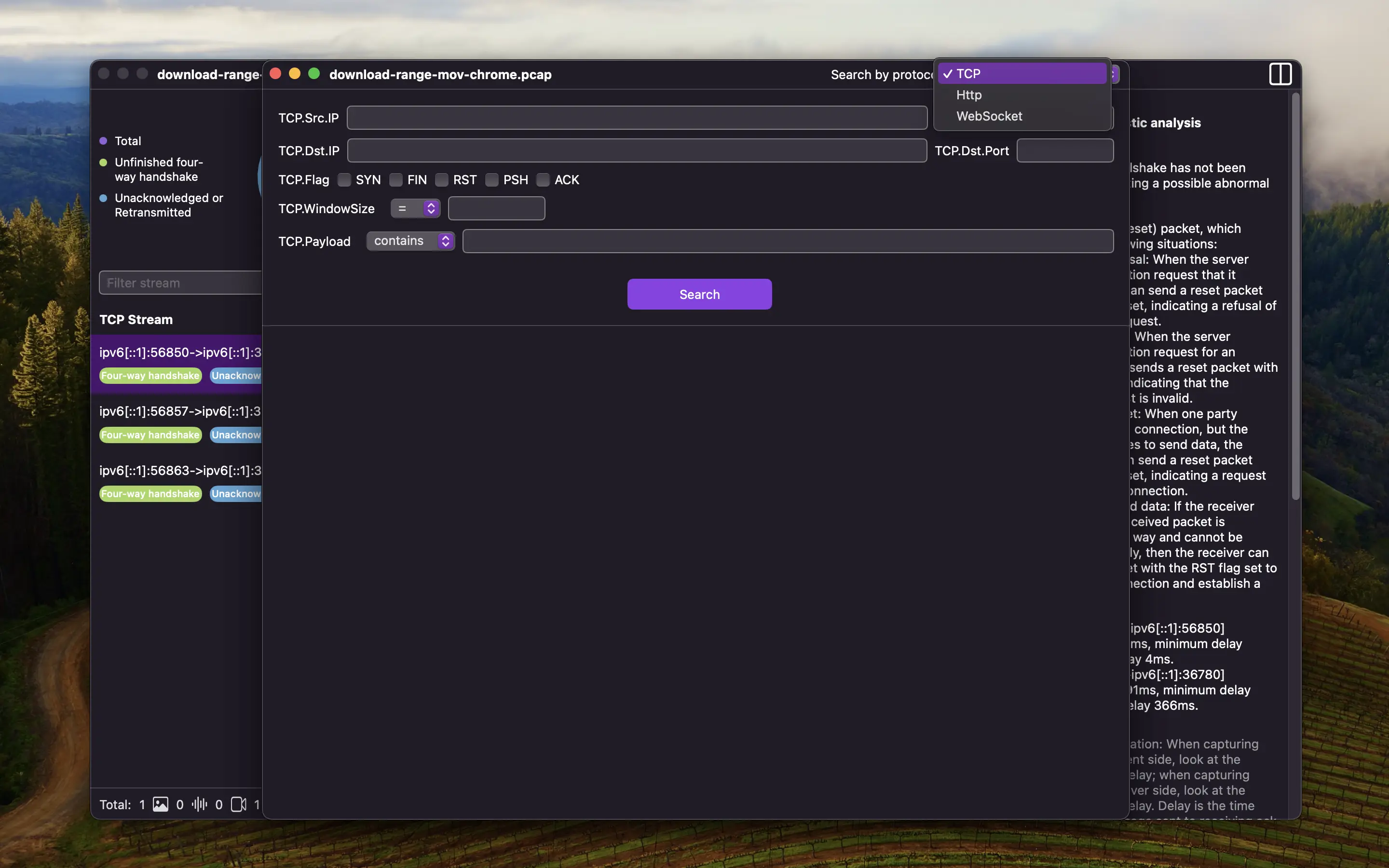
No need to write filter expressions, search by filling out forms without remembering filter expressions.
Search condition forms corresponding to data structures have been implemented for TCP protocol and several application-layer protocols.
Search the entire PCAP file directly. Search results may contain multiple packets from multiple connections, and results are still displayed in chat view.
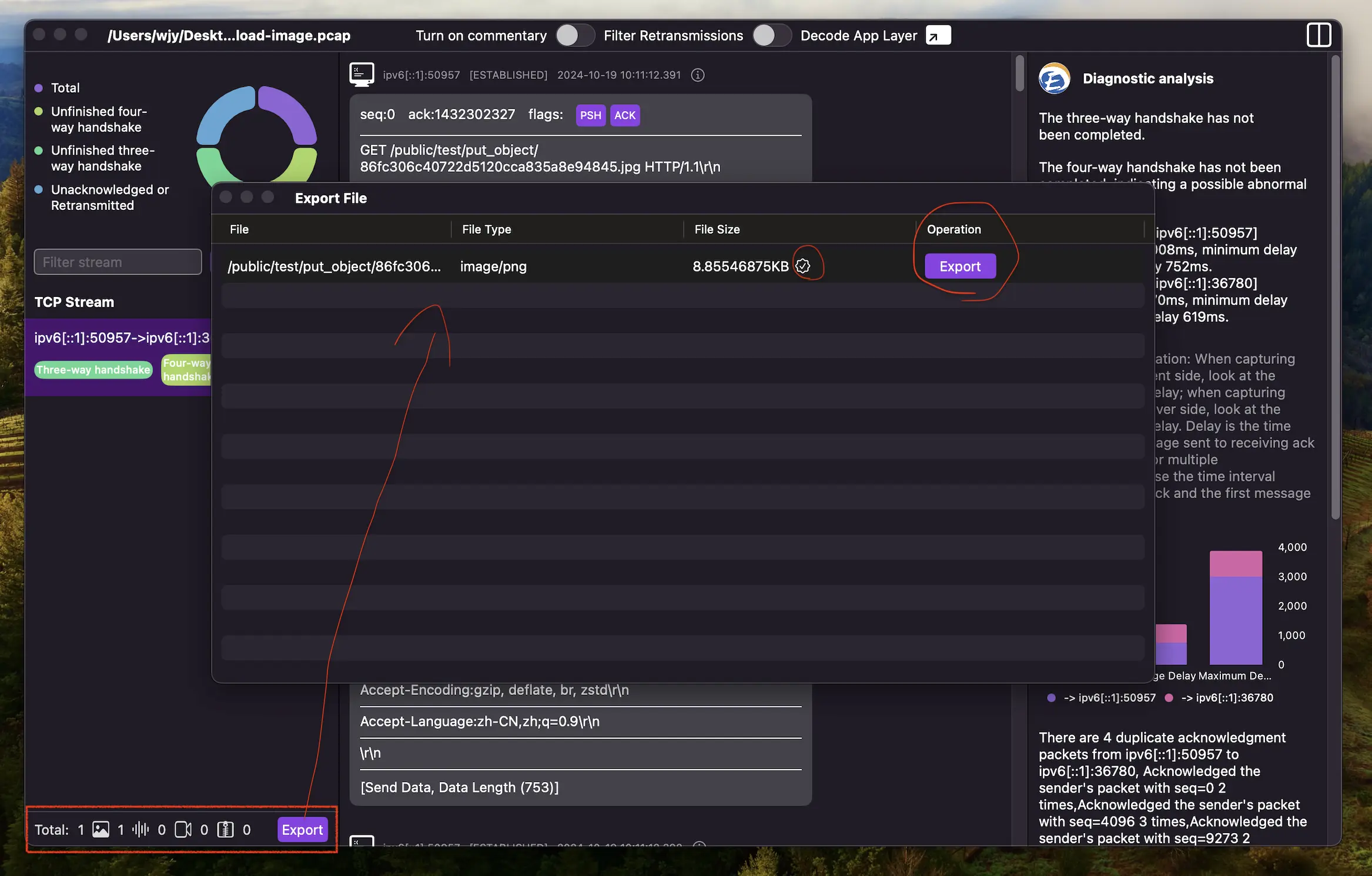
Extract HTTP-Transferred Files in One Click
Export files transmitted via HTTP protocol, supporting images, videos, audio, HTML, Text, JSON, XML and binary files.
The system automatically identifies files transmitted via HTTP protocol in all TCP connections, and can properly handle HTTP Range requests and compressed transfers.
Who Is ChatTCP For?
A PCAP analysis tool built for developers, network security engineers, and students.
Development & Debugging
Quickly isolate unexpected disconnections, mismatched request/response data, and HTTP anomalies during frontend-backend integration.
❯ tcpdump -i eth0 port 80
listening on eth0, link-type EN10MB...
Network Security Analysis
Visually analyze plaintext traffic characteristics, investigate anomalous network behavior, and assist security engineers in auditing packets.
Network Troubleshooting
Automatically diagnose packet loss, retransmissions, and high latency to pinpoint the root cause of request timeouts or slowdowns.
Computer Networking Education
Help students easily grasp the underlying mechanics of TCP's three-way handshake and four-way teardown through a chat-style visualization.
Out-of-the-Box Protocol Decoding
ChatTCP automatically reconstructs TCP/UDP streams, extracts application-layer payloads, and parses structured data.
HTTP/1.1 & HTTP/2
Inspect requests and responses cleanly with automatic handling of chunked transfers and gzip/deflate decompression.
WebSocket
Trace full-duplex frames in real-time, with transparent decompression of permessage-deflate extensions.
Databases (MySQL & Redis)
Reconstruct raw database queries and commands to easily debug connection issues and slow queries.
DNS (UDP)
Resolve domain queries and server responses visually to diagnose resolution errors instantly.
Custom Decoders
Write custom decoders in JavaScript to parse your own private protocols. ChatTCP handles TCP stream reassembly automatically, so you don't need to deal with packet fragmentation or coalescing—just focus on defining your protocol's data structure.
Why Choose ChatTCP?
Say goodbye to traditional packet data grids and complex filter syntax. Experience a modern packet capture analysis tool.
Intuitive Chat-Style Interface
Ditch the tedious data grid. An innovative chat-style UI layout lowers the barrier to TCP analysis.
Built-in AI Diagnostic Assistant
AI is your best tutor—ready to analyze network issues and guide you through troubleshooting.
Works Right Out of the Box
No complex filter expressions to memorize. Chat-style interaction means even beginners can get started with ease.
How to Get Started with ChatTCP
We offer a convenient web-based viewer and offline desktop apps for Windows and macOS, covering every use case you need.
Web App (Online)
1. Upload Your PCAP File
No installation needed. Open the website and drag & drop your PCAP/PCAPNG file to start viewing and analyzing it online.
2. Cloud Analysis
The server automatically handles stream separation and application-layer protocol decoding, streaming results to your browser via SSE in real time.
3. Diagnose & Analyze
Inspect your traffic in a clean chat view and call up the AI assistant at any time for instant troubleshooting recommendations.
Offline Desktop App
1. Download & Install
Available for Windows and macOS. Download, install, and run it without any internet connection.
2. Import Your PCAP File
Open a PCAP file to view and analyze it. All parsing happens locally, ensuring complete privacy for sensitive enterprise data.
3. Native Performance
Enjoy the smooth experience of a native desktop app—no file size limits, no network latency.
Learning Resources
Dive deep into how network protocols work through interactive demos and real-world examples.
Frequently Asked Questions
Frequently asked questions about ChatTCP to help you better understand and use our tools
Initially, ChatTCP only supported viewing and analyzing TCP traffic in PCAP. The 'TCP' in the name refers to the TCP protocol, indicating that it is a TCP analysis tool. 'Chat' refers to the tool's core feature—a chat-like interactive interface. Thus, the name ChatTCP.
With the iteration of features, ChatTCP can now view not only TCP packets but also UDP packets in PCAP files. However, due to the different concepts of TCP and UDP, they are not merged together but separated into different traffic pages.
In addition to viewing TCP and UDP packets in PCAP, ChatTCP also provides PCAP network analysis reports.
ChatTCP can automatically analyze connection anomalies, such as incomplete handshakes, client/server initiated disconnections, retransmission packets, unacknowledged packets, etc. It calculates connection latency, packet loss rate, and retransmission rate. For application layer, it currently supports HTTP protocol diagnosis, automatically analyzing HTTP anomalies like status codes, request headers, and response headers.
The AI diagnostic analysis assistant converts packets into structured data, decodes application layer protocol data, and provides basic analysis data, enabling AI to understand packets and perform further reasoning analysis, extending ChatTCP's diagnostic analysis capabilities.
ChatTCP currently supports decoding of HTTP, WebSocket, Redis, MySQL, DNS, and other protocols, but does not support TLS protocol decoding.
In addition to the default supported protocols, you can also use ChatTCP's protocol decoding plugin feature to write JS scripts to decode custom application-layer protocols.
There's no functional difference between ChatTCP online version and the APP, but they differ in implementation.
The online version requires uploading PCAP files to the server for analysis, while the APP analyzes locally offline. If you're concerned about privacy data leakage in PCAP files, we recommend downloading the APP for use.
MCP is provided by the online version, and using MCP Server requires uploading files to the server.
Wireshark is an all-encompassing protocol analyzer for power users. ChatTCP, however, focuses on making TCP analysis accessible through an intuitive, chat-like interface, allowing developers to solve most common network problems instantly without the steep learning curve.
We strictly adhere to our privacy policy and will not leak private data from user-uploaded PCAP files in the online version. Our APP performs offline local analysis and does not collect user data.
Please note that the APP's AI diagnostic analysis assistant feature requires interaction with AI models, so we recommend confirming there's no sensitive privacy data before using the AI diagnostic analysis assistant.
User Reviews
Feedback provided by some users via email
"这个应用虽然比较小众,但是对于从事网络相关的开发还是非常有用的,期待后面的功能体验优化以及更多的特性。"
Wklken Woo
China
Nov 27, 2025
"I stumbled upon this tool, and the idea of viewing network packets like a chat log is brilliant! It's incredibly simple to use."
Emily Rodriguez
USA
Oct 12, 2025
"I absolutely love this tool, it fits my workflow perfectly. No need to study tutorials like Wireshark, forget about learning filter expressions or memorizing TCP flags!"
jheisler sokolis
USA
Sep 5, 2025
Recommended at XCon2025 Security Focus Information Security Technical Summit:
"使用ChatTCP工具辅助阅读网络数据包:可视化,可交互模式帮助安全工程师阅读理解网络数据包,甚至是跟着大模型一起学习网络协议,全面拓宽安全人员的工作技能,增强网络故障的诊断、分析和排障能力。"
二米
China
Aug 22, 2025